How to Install Mods in Project Zomboid
- ▸ Install Mods with Steam Workshop
- ▸ Install a Single Mod
- ▸ Install a Mod Collection
- ▸ Install Mods on GOG and Standalone Versions
- ▸ Download the Mod Files
- ▸ Copy the Mod to the Correct Folder
- ▸ Enable Mods
- ▸ Dependencies
- ▸ Use Mods in an Existing Save
- ▸ Troubleshooting
- ▸ Frequently Asked Questions
- ▸ Do I need to start a new save?
- ▸ How do I uninstall mods?
- ▸ Do mods work in multiplayer?
- ▸ How do I update mods on GOG?
Installing mods in Project Zomboid depends on which version of the game you own. Steam users can install mods directly through the Steam Workshop, while GOG and other standalone versions require manual installation. Both methods are straightforward once you know where the files belong.
Install Mods with Steam Workshop
If you own Project Zomboid on Steam, Workshop is the easiest way to install and update mods.
Install a Single Mod
- Open Steam and go to the Project Zomboid page.
- Click the Workshop tab.
- Find the mod you want.
- Open its page and click Subscribe .
- Wait for Steam to finish downloading the files.
- Launch the game and enable the mod from the Mods menu.
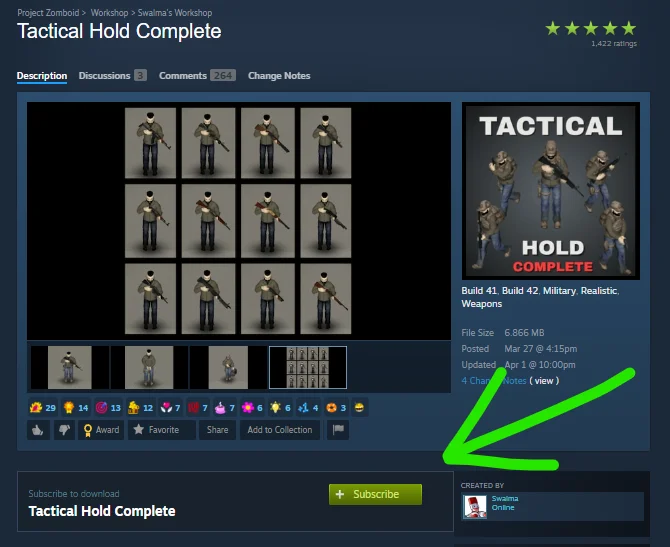
If the game was running while you subscribed, restart it if the mod does not appear in the mod list.
Install a Mod Collection
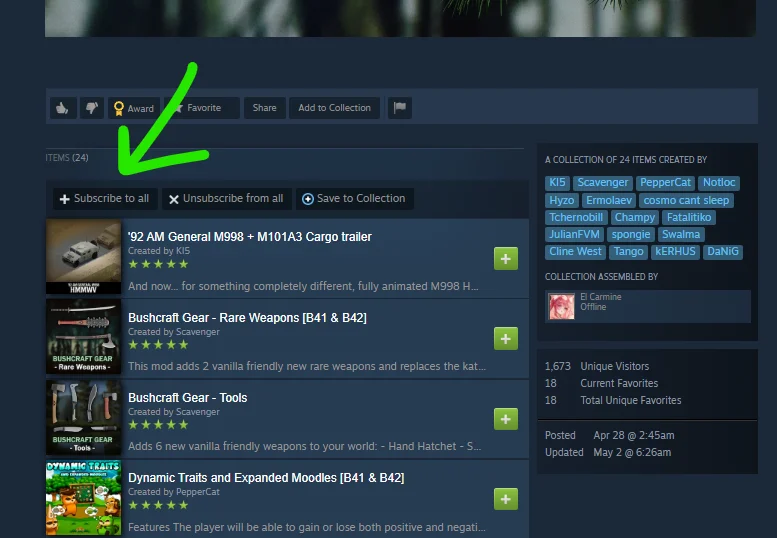
Workshop collections install multiple related mods at once. Open a collection and click Subscribe to All . Before enabling everything, read the collection description for required libraries, compatibility notes, or known conflicts.
Install Mods on GOG and Standalone Versions
Standalone versions do not support Steam Workshop. Mods must be downloaded and installed manually.
Download the Mod Files
Download the mod archive from our Project Zomboid Mods collection, or use SteamCMD if you prefer to retrieve Workshop files manually.
Copy the Mod to the Correct Folder
Extract the archive into:
C:\Users\YourUsername\Zomboid\mods
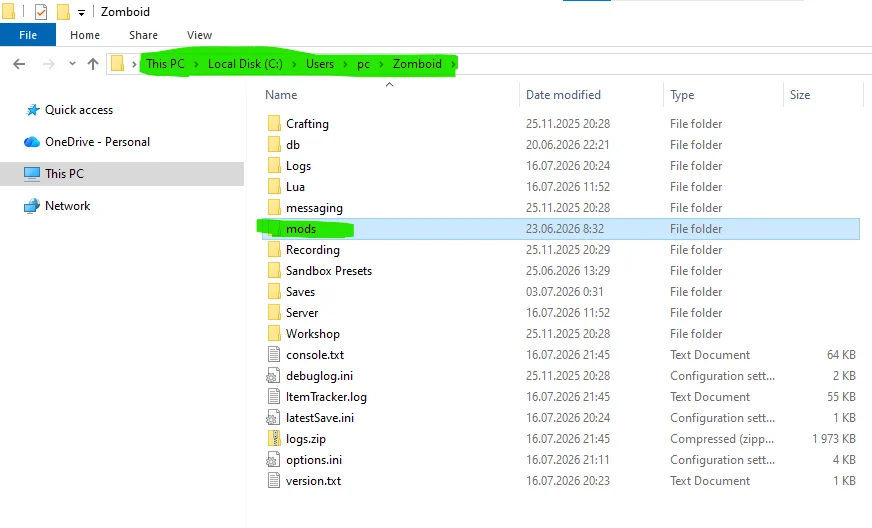
If the mods folder does not exist, create it.
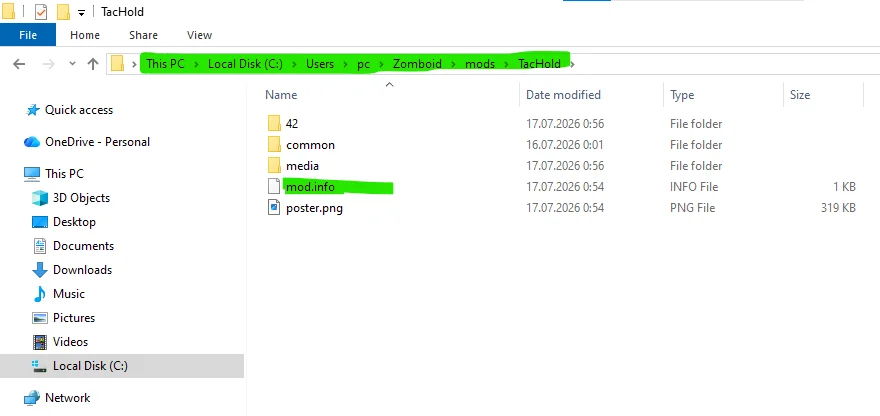
A correctly installed mod should look like this:
...\Zomboid\mods\ModName\media
The folder should also contain a mod.info file.
If the archive creates an extra folder, resulting in a path like:
...\Zomboid\mods\1122233_ModName\1122333\ModName\media
move the inner ModName folder up one level. Project Zomboid will not detect the mod otherwise.
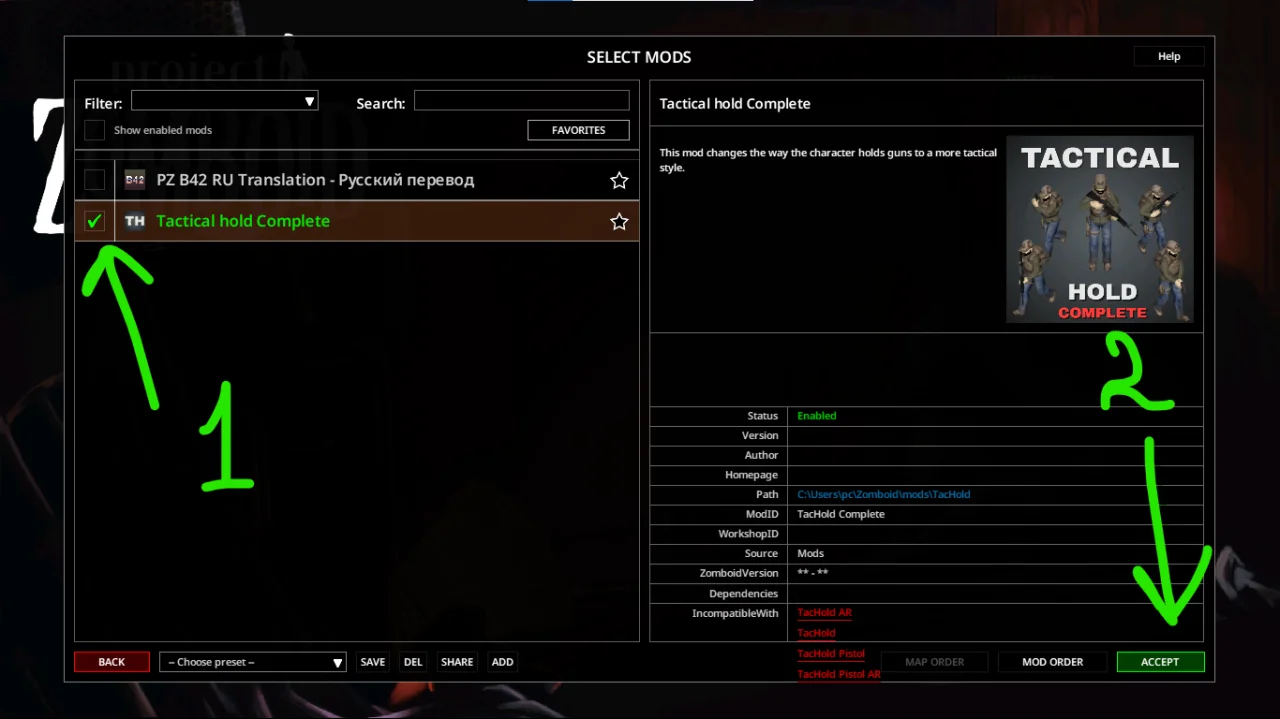
Enable Mods
- Start Project Zomboid.
- Open the Mods menu.
- Select the mod.
- Click Acept
Dependencies
Some mods require additional libraries. Vehicle mods, for example, often depend on Tsars Common Library . If a required dependency is missing, the mod menu displays a Require warning. Install and enable every required dependency before starting the game.
If you use many mods, a Mod Manager can help organize load order and save different mod presets.
Use Mods in an Existing Save
Enabling a mod does not automatically apply it to an existing save.
- Click Load from the main menu.
- Select your save.
- Click More .
- Select Choose Mods .
- Enable the required mods and confirm the changes.
Adding map mods to an existing world may cause issues in already explored areas. They work best in unexplored regions or on a new save.
Troubleshooting
- Mod does not appear: Check that it is installed inside Zomboid\mods and that no extra folders were created during extraction.
- Black screen on startup: The mod may not support your current game build. Verify its compatibility before enabling it.
- Red error messages: A few errors are usually harmless. Continuous red errors often indicate a broken mod or a conflict with another mod.
- Game crashes: Disable recently added mods in small groups until you find the one causing the problem.
Frequently Asked Questions
Do I need to start a new save?
Not always. Item, vehicle, and interface mods usually work with existing saves. Large map expansions or major gameplay overhauls often require a new world.
How do I uninstall mods?
Steam users can unsubscribe from Workshop mods. Standalone users can remove the corresponding folders from C:\Users\YourUsername\Zomboid\mods .
Do mods work in multiplayer?
Yes. Every player and the server must use the same mod versions, and the mods themselves must support multiplayer.
How do I update mods on GOG?
Download the latest version and replace the existing mod files in the mods folder.
Steam Workshop handles installation automatically, making it the easiest option. Manual installation only requires placing the files in the correct folder and enabling the mod in-game. If you plan to use many mods, install and test them a few at a time to make troubleshooting much easier.
 ATZ → New Clothing Models [B42]