Mod «ZombieBuddy» for Project Zomboid

ZombieBuddy is a framework that enables advanced Java mods for Project Zomboid. It is required by specific mods to function and supports game versions Build 41 and Build 42.12 through Build 42.17. The mod is compatible with multiplayer and can be safely added or removed from existing saves.
Security Features:
- Java mods enabled through ZombieBuddy have unrestricted system access; only trusted sources should be used.
- A native approval dialog displays the mod ID, file path, last-modified date, and SHA-256 fingerprint before loading any new or updated JAR files.
- Approval decisions can be persisted per mod and hash in or kept session-only.
- mod_approvals.json
- Holding Shift during game load forces the approval dialog to appear for previously approved mods.
- If a previously approved JAR changes on disk, the user is prompted again.
Installation (Windows):
- Automated Installer (Recommended): Download ZombieBuddyInstaller.exe from GitHub Releases. Run the installer and select «Install or update ZombieBuddy.» Choose to patch Normal Launch, Alternate Launch, or both. The installer requests confirmation before applying changes and can also be used to uninstall.
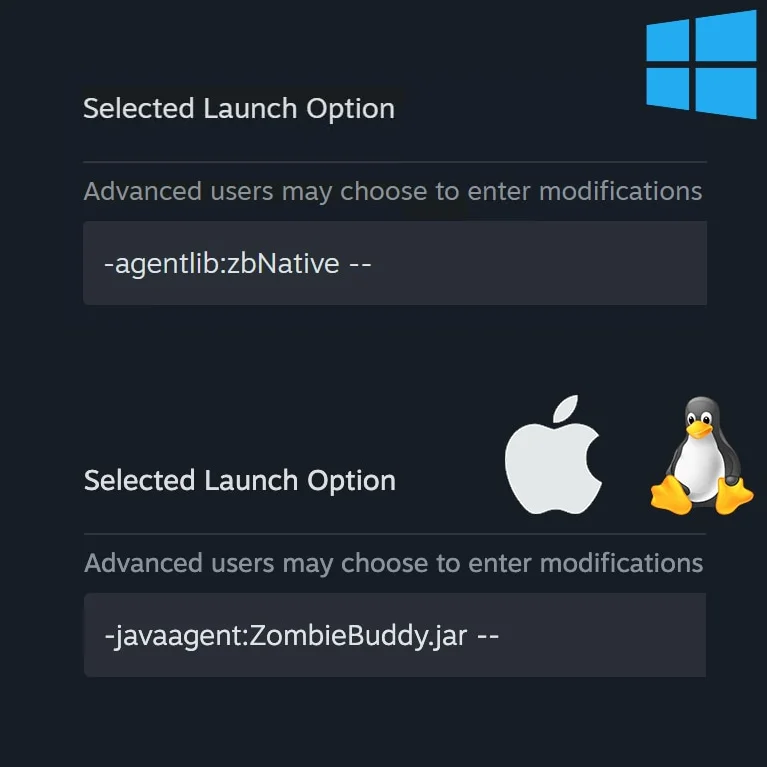
- Manual Installation: Copy ZombieBuddy.jar and zbNative.dll from the mod's libs directory to the Project Zomboid installation folder. Add to Steam launch options. The trailing
- -agentlib:zbNative --
is mandatory. For Alternate Launch, set- --
in ProjectZomboid64.bat.- SET _JAVA_OPTIONS=-agentlib:zbNative
Installation (macOS / Linux):
- Copy ZombieBuddy.jar from the mod's libs directory to the appropriate game folder (ProjectZomboid.app/Contents/Java/ for macOS or projectzomboid/ for Linux).
- Add to Steam launch options. The trailing
- -javaagent:ZombieBuddy.jar --
is mandatory.- --
Java Mod Policy:
Controls behavior for unknown or changed JARs via the
- prompt (default): Asks via native dialog each time.
- deny-new : Silently skips any JAR that is not already approved.
- allow-all : Loads every JAR without prompting (not recommended).
Uninstallation:
- Disable the agent by clearing the Launch Options line in Project Zomboid properties.
- Delete zbNative.dll and ZombieBuddy.jar from the game installation directory.
- Unsubscribe from ZombieBuddy on Steam Workshop.
Technical Information:
- Workshop ID: 3619862853
- Mod ID: ZombieBuddy
Mod Info
Category:
Version:
07.05.2026
Size:
11.9 Mb
Added by:
Download Links
File Security
SHA-256:
1fc0344c170298eaf1e80e1877ed83615ba66eb6fdcbf68ab36640170ff2b5dc
VT Detection:
0/65
VT Report:


![Guaranteed Modded Map Loot Re-Spawn [B42]](/upload/000/u1/9/5/747e801d.webp "Guaranteed Modded Map Loot Re-Spawn [B42]")
Last Comments  ATZ → New Clothing Models [B42]
ATZ → New Clothing Models [B42] 2 months ago