Mod «Seed Season Indicator» for Project Zomboid
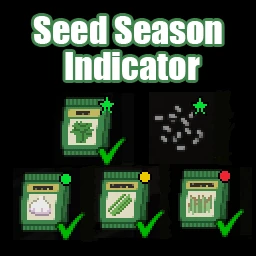
Seed Season Indicator is a mod for Project Zomboid that overlays markers on seed and seed packet icons in the inventory to indicate the current month's sowing season status. This allows players to determine at a glance whether each seed is ready to plant without opening the Agriculture tab.
Marker Types:
- Green ★ — Best month: peak yield period.
- Green ● — In season: safe to plant.
- Yellow ● — Risk month: plantable, but with a risk of reduced yield.
- Red ● — Out of season: cannot plant now.
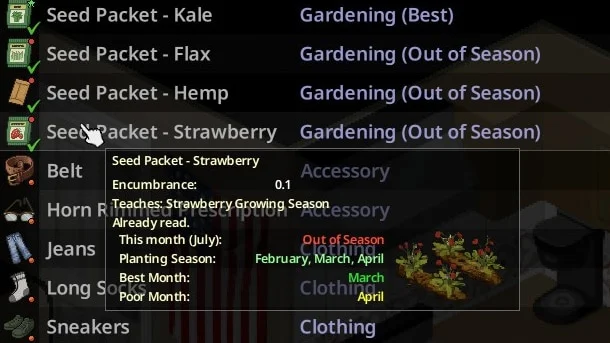
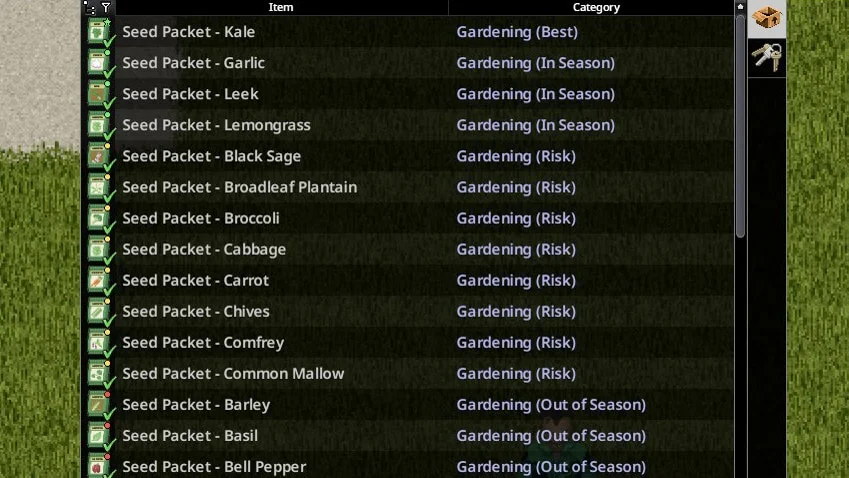
Markers appear only on seeds and seed packets for which the player has read the seed packet and learned the corresponding sowing season recipe. The «Category» column in the inventory detail view also shows the season status (e.g., Gardening (Best), Food (In Season)) and can be sorted by it. Hovering over a seed or seed packet appends season info, minimum water requirements, average grow time, and an image of the fully grown crop to the tooltip.
The mod includes configuration options to enable or disable indicators, tooltip info, and specific marker behaviors for crops without a defined best month. Note that markers are hidden if the sandbox setting PlantGrowingSeasons is disabled, such as in the «Outbreak» difficulty preset.
Technical Information:
- Workshop ID: 3734639991
- Mod ID: SeedSeasonIndicator
Mod Info
Download Links
![Starving Zombies: Realism [B42.20]](/upload/000/u1/2/0/c7034886.webp "Starving Zombies: Realism [B42.20]")

![Companion Dogs [ALPHA]](/upload/000/u1/2/a/27f7dccc.webp "Companion Dogs [ALPHA]")


![[B42] Bandits NPC](/upload/000/u1/7/7/116be89f.webp "[B42] Bandits NPC")
 ATZ → New Clothing Models [B42]