Mod «O.C.D. Inventory» for Project Zomboid

Edited on: 03:14 .
Reason: The mod updated to version 05.09.2026
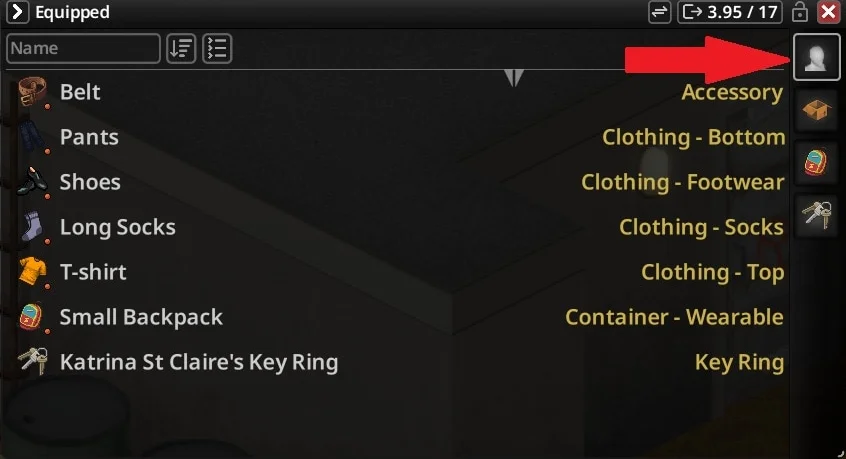
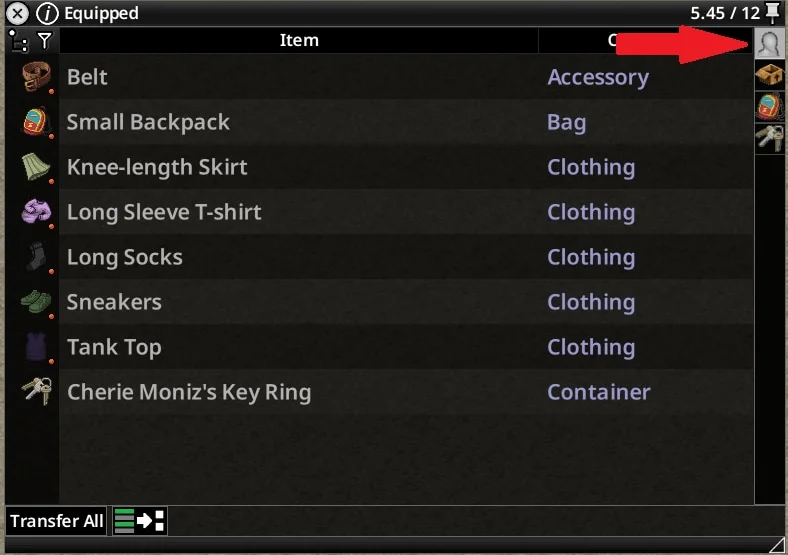
O.C.D. Inventory (Organized Containers & Displays) adds an Equipped icon above standard inventory containers for Project Zomboid Build 42.19+. Worn gear, hand items, keyrings, and hotbar-attached equipment are displayed in a unified view without replacing the vanilla inventory list. The mod is designed to work with CleanUI but remains compatible with the vanilla inventory interface with a reduced feature set.
- Equipped Icon: Displays a mannequin icon above inventory and bags
- Equipped List: Shows all equipped items as a separate container
- Hide Equipped Items: Removes equipped items from the main inventory, displaying them only in the Equipped section
- Drag and Drop: Allows wearing clothing/bags, equipping weapons/hand items, unequipping worn/hand items to inventory, and detaching hotbar/back items to inventory
- Hotbar Shortcuts: Retains vanilla equip and put away hotkey functionality
Technical Information:
- Workshop ID: 3773985930
- Mod ID: OCDInventory
- Version: 0.1.1
Compatible with Steam, GOG, and non-Steam copies. Requires manual setup.
Mod Info
Category:
Version:
05.09.2026
Size:
1.3 Mb
Added by:
Compatible with Project Zomboid
Download Links
Version 02.08.2026 : Download
You May Also Like



![Neat Building [B42]](/upload/000/u1/9/f/f276ad9b.webp "Neat Building [B42]")
Last Comments  ATZ → New Clothing Models [B42]
ATZ → New Clothing Models [B42] 2 months ago